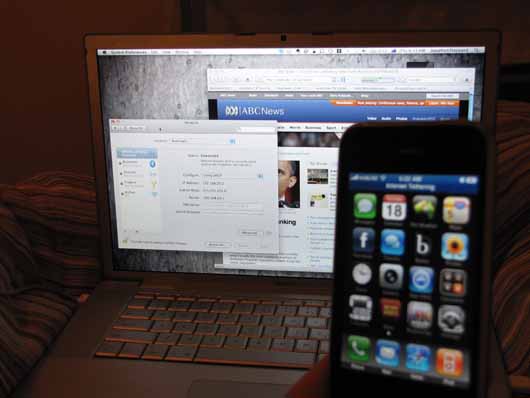
iPhone 3.0 Tethering Working On Vodafone, Not Optus Or Telstra
Now that a good chunk of the 40 million iPhone owners around the world have upgraded to iPhone 3.0 software, we’re hearing local reports that internet tethering is working for Aussie Vodafone customers, but not Telstra or Optus ones. Typical.
To be fair, Telstra haven’t said one way or the other that they’ll support (or not support) internet tethering for the iPhone, while we sort of expected Optus to charge us a bit extra considering all the evidence has pointed that way. So really, the real winners here are Voda iPhone customers. They get both Visual Voicemail and internet tethering without having to do anything, or paying any extra.
It looks like Vodafone wins this round…
[Thanks Jono]
- Next Post: Researchers Cram A Camera Into A Sheet Of Fiber »
- « Previous Post: Palm Pre Vs. IPhone 3GS: How To Make The Right Decision

Comments
Note that you can enable tethering instantly with Telstra by going to http://bit.ly/tiph in Safari on the iphone (or http://bit.ly/tinet if you use the telstra.internet APN for some reason)
Thanks Rob. FYI, those two bitly URLs are reversed. http://bit.ly/tiph is the “telstra.internet” APN, and http://bit.ly/tinet is the “telstra.iph” APN.
I am with Optus and have had tethering working for a week. Although my mate gave me some carrier setting file which made it work! Pretty fast too, i’m guessing I will be hammered in my next bill for using tethering without signing up to a different plan! Im on a standart 59 iphone cap plan
If you use the carrier file, there is no way for them to distinguish between regular internet usage on your iphone and tethering. It does of course use your data allowance as normal, and seeing as you are with Telstra, it won’t be that much.
I have Telstra tethering.. search whirlpool forums on how to activate. Was easy as going to a URL on Safari to bypass.
Working no problem since last week.
I called Optus this morning after upgrading and they say:
“..still working things out with charges, etc”
currently Optus staff are being asked to communicate June 21st as the date the service will go live.
This goes inline with previous posts about Optus charging :( Damn It, don’t they make enough money out of us!!
So no vodafone tethering charges? has this been confirmed?
I’m with Virgin.
I connected to iTunes and it asked if I wanted to update my carrier settings.
I now have ‘tethering’ available in my settings.
I’ve also read that the Virgin call cap includes MMS and the data plan includes tethering.
Go Virgin!!
How can the carriers tell if you’re using the tethering function? Isn’t it all data to them?
If you use a modified carrier setting file, they can’t. It’s just plain data to them. If you do use their unmodified carrier setting file, they have a separate APN for tethering so they can track it.
Telstra does work, but it involves sorcery.
I think the big T will clamp down on said sorcery and/or they will enable it, but charge a boatload.
Remember to keep your usage down while its all up in the air incase it goes the wrong way.
Speedtest.net from earlier:
Down:~2.5 (was like 2.43 then 2.46 etc)
Up: ~0.25 (again, .24 .23 etc).
Ping from Melb -> Melb was about 200.
Not bad! If the 3GS can do twice that I’d be very happy. But of course the price better be right…
Am with Virgin… tethering works beautifully through USB connection…
Can’t get it to work with Bluetooth… help anyone?
Finally I can use my 1GB allowance/month to its full extent… GO VIRGIN MOBILE!!
Wait, why would they charge just for ‘tethering’? Isn’t this something between your phone and laptop? Doesn’t the tether just use the monthly download allotted to your phone plan?
My Nokia E71 came with a 2GB plan and I just connect it to my laptop and use that data.
I’ve just updated and tethering works beautifully with Optus. I find it’s significantly quicker when you use USB as opposed to Bluetooth though….
G…how did you get it to work through optus?
seems to be working with 3 – bluetooth and usb:)(usb faster, agreed!)
https://personal.optus.com.au/web/ocaportal.portal?_nfpb=true&_pageLabel=Template_wRHS&FP=/personal/mobile/iphone3G/faqsiphoneossoftware&site=personal
Says here ‘iPhone as Modem’ will go live 22 June.
Telstra already offer ‘Mobile as Modem’ data packs. I don’t see how it should be any different for iPhone tethering. If they try to charge me more than I’m already paying for my 300mb data pack, they’ve got another thing coming.
Rob Thomas’ link got me up and running with ease. Thanks Rob.
Anyone know how to get the 3.0 tethering on a PC that does not have itunes?
The tethering works fine for my main desktop machine which has my itunes library, trying to get it to work on my laptop is proving to be a battle.
I got it going on my work PC, but I had to install iTunes in order to get the required drivers & services etc.
You don’t need to sync your phone to tether (or even have iTunes running).
Just install it, and it works.
Prior to installing, I could see a network connection available, but said the cable was unplugged (when it clearly was plugged in).
Just got it going after a few minutes on my Mac via a Virgin iphone. Only working with USB at the moment, can’t seem to pair it with bluetooth. I can wait.
Works great on Virgin Mobile via USB cable. Don’t have bluetooth on my laptop to see how that goes.
Now I’m able to make use of my 5GB month quota.
And now I’ve got it working via Bluetooth too. Just had to turn off the bluetooth on the iphone and turn it back on again to get things moving.
the profile at the link here http://help.benm.at/help.php works for tethering on optus but it also stops MMS working.
I havent worked out how to get both Tethering and MM working at once but i’ll be damned if optus will be seeing a cent from me for tethering, it’s free on all other phones why should iphone users have to pay extra to use the data i’m already paying for, i barely use 20mb a month of the 700 i pay for a month! bout time i get to use some more i say.
Im using 3, and it works fine for tethering, but for MMS I need to manually config my own setting.
Try this for OPTUS:
Tap on Setting – General – Network – Cellular Data
Under MMS:
APN: yesinternet
Username: leave blank
Pass: leave blank
MMSC: http://mmsc.optus.com.au:8002
MMS Proxy: 61.88.190.10:8070
Must restart your iPhone!
Found it!
The below link works on Optus for Tethering and MMS,
open the below link in Safari on your phone and your set
http://weave.zarack.com/OptusTetherv1.mobileconfig
Nice one Gavin. No problems for me. Seems to be working a ok :)
I am also with Virgin and at this stage it works perfectly with USB but intermittently via Bluetooth… the connection keeps coming up as “Local Only” and wont give me Internet until I connect the USB cable. Anyone else having this issue?
Tethering and MMS both work on the three network. I’ve just got a $20 X-series data plan. Has a link and screenshot which detail the setup
http://forum.networkfoo.org/viewtopic.php?f=8&t=3&p=4#p4
If anyone needs a carrier setting file to enable tethering plus MMS on their iPhone, go to the following link: http://blog.poedsoft.com/2009/06/iphone-tethering/
It has carrier files for Telstra, Optus, Vodafone and 3.
To tether, go to this site and download. Works for me:
http://tetherme.lstoll.net