Mobile

Aussie iPhone Tethering Guide – All Carriers

Flag
3:24PM June 19, 2009 | Nick Broughall

optus-tetherOne of the most talked about features of the new iPhone 3.0 software update is internet tethering, or being able to use your iPhone as a mobile modem for your laptop. Both Optus and Vodafone have announced they’ll support the service, although Optus has stated that they’ll be charging you for the privilege. Telstra, Three and Virgin are all yet to publicly announce support for the feature, but thanks to some enterprising people, you can get your iPhone tethered to your laptop for free, today, regardless of carrier. Here’s how.

Before we begin, it’s worth noting that online reports are saying that both Vodafone and Virgin iPhones can tether without requiring any special effort, so it’s probably best to try doing it that way first. All you need to do is select the the Settings –> General –> Network buttons on your iPhone, then choose ‘Set Up Internet Tethering’ and follow the prompts. If you get a message saying you need to contact your provider (which is what happens for Optus customers), you can try the solution below.

Also worth noting: This solution is not endorsed by the carriers, and in some cases may in fact be in breach of contract. Therefore, it’s very much a case of “Do it at your own risk” – in the UK, O2 has publicly stated that they “reserve the right to charge customers making modem use of their iPhone or disconnect them,” so don’t come crying to us if Optus or Telstra decide to add a little fee to the end of your next bill.

In any case, here’s how you get tethering on your iPhone, without jailbreaking, for all Australian carriers:

1. Open Safari on your iPhone and navigate to help.benm.at
2. Have a read through all the warnings so you know what you’re in for, then select the Mobileconfigs option.
3. Select Australia
4. Choose your network
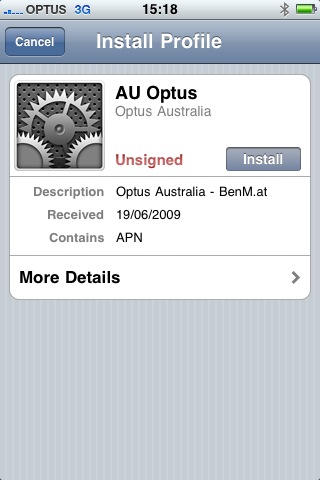
5. When the option to Install Profile appears, press Install
6. You’ll get hit with a message saying that the authenticity of the profile can’t be verified and that installation will change settings on the phone. Select Install Now.
7. Once it’s done, exit Safari, go back into Settings –> General –> Network and try to set up tethering again. Follow the prompts and everything should just work.

With this solution, you may need to restart your iPhone to get MMS working again – although some people are saying that it kills MMS completely. And there’s no telling what Optus and Telstra might do once they discover your cheating them out of a monthly tethering fee, regardless of how ridiculous the fee is in the first place.

If you are game to give it a go, let us know how it works for you in comments… And remember – do this at your own risk!


Comments

  • Mark Hansen

    July 16, 2009 at 11:23 AM

    I am with telstra and have iPhone 3os buy I have no teathering option under settings. Why not?

  • Andrew Beattie

    August 13, 2009 at 11:02 AM

    tethering seems to work automatically on my 3 service :)

  • adam

    September 14, 2009 at 8:58 PM

    i updated the iphone’s OS two days ago.. it seems tethering has disappeared from the menu.. wondering whats happened :( i quite enjoyed this feature!

  • Dave

    October 7, 2009 at 9:22 PM

    I used your poedgirl tether and all was fine until the 3.1 update.
    Now Optus have given me free tethering BUT even though they have enabled it the Tethering option will not reappear. Optus say I need to do a FULL restore which would be a real hassle.
    My question is – If I remove the Poedgirl profile then can i get the original optus profile back?
    And would this fix it?

  • Stephen

    October 19, 2009 at 6:28 PM

    Hi all,
    Tethering on Optus works with the above link, however i notice that while tethering, i get disconnected when trying to make or recieve calls.

    Device: iPhone 3G 16GB
    Connectivity: Both USB and Bluetooth
    Network: YES OPTUS
    Carrier: OPTUS 4.0
    Modem Firmware: 04.26.08
    OS: Version 3.0.1

    Any help would be great!

    Cheers
    Stephen

  • Duke

    November 17, 2009 at 12:32 AM

    Does anybody know that if you get tethering working, can Skype be used in this environment? (ie: not in a wifi hotspot)

  • bitbot

    December 21, 2009 at 9:46 AM

    I installed a new profile (can’t remember source) because I could not get tethering working on Vodafone. It killed my MMS, and made the tethering option disappear from Settings.

    poedgirl’s profile has restored my MMS – thank you! – but I still can’t select tethering in Settings! ANy suggestions, folks?

  • Pete Smith

    January 29, 2010 at 8:56 AM

    I applied the profile to my iphone running 3.1.2 using Optus and the option for tethering in the network settings has diapered. Will now have to restore via itunes and try blackra1n, blacksn0w and Cydia.

  • annoyed

    February 7, 2010 at 4:57 PM

    Just did this work around using the optus, and when I went to my settings and then to network, I actually watched my Tethering option dissapear, tried rebooting the iphone and its still not showing up…

  • Asif

    March 29, 2010 at 10:57 AM

    Hi Nick thanks for that. problem is I installed the APN and restarted my iPhone. but when I go into the Settings –> General –> Network the option “set up tethering” just vanished. I got only -
    -Enable 3G
    -Data Roaming
    -VPN
    -Wi-Fi

    PS. Tethering was there before install, but now vanished.

    I am using Virgin in Australia

    thanks in advance.

    Asif

  • Scott

    March 30, 2010 at 11:36 AM

    So I downloadd the app from help.benm.at as suggested and it did sweet FA .. oh except totally kill MMS .. Thanks evry helpful …NOT.

    Does anyone know how to fix the MMS as I had one problem with setting up tethering ! now have two problems

  • Pat

    April 12, 2010 at 10:31 AM

    Optus want a 10 dollar fee for connnecting the tehtering option then another 10 dollars monthly for the tethering when i lost it and said that i am paying for a service i already have they told me to like it or lump it. Cheating scamming pricks.

  • Peter Markowsky

    April 20, 2010 at 5:17 AM

    OPTUS USERS:

    Hi, I have just tried this on my partners Virgin (Optus) mobile. It didn’t work. The web page timed out. I tried it on my own Telstra phone and worked fine. I thought it might have been a bandwidth problem but could search other pages fine. Seems to be blocked. Any ideas.

  • minga

    May 16, 2010 at 6:07 PM

    so… has anyone being charged on their bills by Optus for turning tethering on???

  • Camduke

    May 23, 2010 at 11:01 PM

    Telstra Users:
    tried this out today and it completly destroyed my sim card??!! I had a pop up saying “SIM not installed”…. Spent my afternoon getting a replacment SIM from Telstra store. Can any other Telstra users shed some light on the tethering?..

  • Mark Barton

    June 3, 2010 at 10:49 AM

    oi telstra can you not lift your game and make tethering an option without hassle,,i already pay for a internet at home and a data package on the iphone so why cant i use the iphone as a modem in my car for the laptop????????

  • snow

    June 24, 2010 at 12:13 AM

    I am with OPTUS and I just upgraded my iPhone to OS4. I followed the steps with the site http://blog.poedsoft etc and install the profile.

    Now when I go to Network settings to setup tethering, I get a “Contact Optus” – and I cannot get pass this screen.

    Has anyone with iOS4 been able to setup tethering using the same profile?

    Is there anything else I can try?

  • Peter

    April 9, 2011 at 6:11 PM

    I’m with virgin mobile in Oz. This didn’t work for me for some reason… Any ideas please?!

  • ljg

    May 19, 2011 at 8:13 PM

    I can’t get the Optus tethering working at all.
    I install the webclip from “benm.at” in system preferences and it seems to have no effect on tethering. when i click on “set up personal hotspot” in “network”, it still comes up with the message “to enable personal hotspot on this account, contact OPTUS”.

    does anyone know what i’m doing wrong/how this can be fixed?

    ljg

  • Nook

    May 25, 2011 at 3:40 PM

    Went to optus today!

    Tethering is now free on some of their services.

    They upgraded my $79 month service to the current offer which includes tethering and 3 gig of data/month for nicks

Post Your Comments