Mobile

Aussie iPhone Tethering Guide – All Carriers

Flag
3:24PM June 19, 2009 | Nick Broughall

optus-tetherOne of the most talked about features of the new iPhone 3.0 software update is internet tethering, or being able to use your iPhone as a mobile modem for your laptop. Both Optus and Vodafone have announced they’ll support the service, although Optus has stated that they’ll be charging you for the privilege. Telstra, Three and Virgin are all yet to publicly announce support for the feature, but thanks to some enterprising people, you can get your iPhone tethered to your laptop for free, today, regardless of carrier. Here’s how.

Before we begin, it’s worth noting that online reports are saying that both Vodafone and Virgin iPhones can tether without requiring any special effort, so it’s probably best to try doing it that way first. All you need to do is select the the Settings –> General –> Network buttons on your iPhone, then choose ‘Set Up Internet Tethering’ and follow the prompts. If you get a message saying you need to contact your provider (which is what happens for Optus customers), you can try the solution below.

Also worth noting: This solution is not endorsed by the carriers, and in some cases may in fact be in breach of contract. Therefore, it’s very much a case of “Do it at your own risk” – in the UK, O2 has publicly stated that they “reserve the right to charge customers making modem use of their iPhone or disconnect them,” so don’t come crying to us if Optus or Telstra decide to add a little fee to the end of your next bill.

In any case, here’s how you get tethering on your iPhone, without jailbreaking, for all Australian carriers:

1. Open Safari on your iPhone and navigate to help.benm.at
2. Have a read through all the warnings so you know what you’re in for, then select the Mobileconfigs option.
3. Select Australia
4. Choose your network
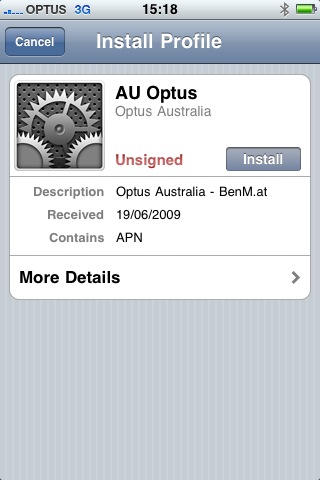
5. When the option to Install Profile appears, press Install
6. You’ll get hit with a message saying that the authenticity of the profile can’t be verified and that installation will change settings on the phone. Select Install Now.
7. Once it’s done, exit Safari, go back into Settings –> General –> Network and try to set up tethering again. Follow the prompts and everything should just work.

With this solution, you may need to restart your iPhone to get MMS working again – although some people are saying that it kills MMS completely. And there’s no telling what Optus and Telstra might do once they discover your cheating them out of a monthly tethering fee, regardless of how ridiculous the fee is in the first place.

If you are game to give it a go, let us know how it works for you in comments… And remember – do this at your own risk!


Comments

  • anon

    June 19, 2009 at 4:01 PM

    love the irony of all the advertising on this page being for OPTUS, topped by the “Brought To You By Yes Optus” at the top of the article.

    • Nick

      July 23, 2009 at 9:53 AM

      anon, today (23rd Jul) its brought to you by the Nokia N series, I don’t think it is irony at all!

  • Keith

    June 19, 2009 at 4:03 PM

    What’s the big deal?
    Virtually all other 3G and even GSM phones can be used tethered – via USB or bluetooth. Why is this even being talked about?

  • Jamie Wilson

    June 19, 2009 at 4:03 PM

    Virginmobile told me that yesterday that tethering was going to be included in my data plan, it also appears to be working, which is great.

  • simiot

    June 19, 2009 at 4:10 PM

    Why is it a problem!? It should cost the same. It’s the same internet, eh.

    :-)

  • Tristan

    June 19, 2009 at 4:17 PM

    Telstra works sweet! – I already pay for a datapack Telstra and you let Blackberry Users tether… please don’t charge iPhone users extra!

    Apple has made a very elegant solution and it “just worked”

    I’ve used WinMo solutions before and Sony Erricsson solutions and they have been painful… this was SOOOO easy!

  • poedgirl

    June 19, 2009 at 4:34 PM

    I did this when I first got the 3.0 final over a week ago with an old beta copy of iTunes 8.2. For reference, the carrier files are all on the Whirlpool wiki for people to download, which could also be used with this method. I know for a fact that those carrier files work perfectly with MMS.

  • andy

    June 19, 2009 at 5:52 PM

    extra charge, pfft

  • Tony

    June 19, 2009 at 6:28 PM

    I am with Vodafone and use a MacBook Pro. The tethering process took less than 10 seconds. It was super easy by turning tethering on in the iPhone and then on the computer 2 clicks to set up there.

    As to cost Vodafone data support told me there is no extra charge but that the data usage simply comes off my existing data allowance on my plan.

    Totally painless and I have to agree with the comment above that Apple designed a perfect system which works easily so long as the carrier decides to play ball. Optus has not done itself any favors here.

  • callan

    June 19, 2009 at 6:55 PM

    i’ve been tethering with a jailbroken iphone for months on optus. just upgraded to 3.0 and it works with this work around. It would be a shame to get charged extra when i’ve been doing it already. you suck uptus!

  • dan

    June 19, 2009 at 7:30 PM

    sweeeeeet, works like a charm on 3… MMS too… when i call 3 they say they don’t support that on iphone… ;-p

  • Steven

    June 19, 2009 at 7:40 PM

    As some others have already said, I don’t see the difference between using a mobile now to access the internet, or using an iPhone.
    Why do they have to charge extra for tethering if you have a datapack on your account??

  • kevin bevan

    June 19, 2009 at 8:01 PM

    Go to http://www.mactalk.com.au to see the Telstra staff training document on the 3GS. No upgrade path for exiting iPhone owners. No tethering. No Visual Voicemail. Typical f’ing Telstra.

  • Sam

    June 19, 2009 at 8:14 PM

    I’m with Optus, and have got tethering working, like it should. Having trouble getting my MMS back tho!

  • Shane

    June 19, 2009 at 11:09 PM

    Apple, constantly doing shit that has been done, but able to market it as a big deal. Apple must be glad to have fans that are dumb, but smart enough to hold down a job.

    • David Skinner

      July 9, 2009 at 3:07 PM

      Well done… You managed to add no substance to this page whatsoever!

    • Sammy

      December 22, 2009 at 1:24 PM

      I agree. We are so easily fooled into thinking “oh it’s new!! I need it.” when others have been doing it for years…

  • John Adams

    June 20, 2009 at 11:22 AM

    Works fine with att. Just follow the instructions in settings. Don’t know about charges if any.

  • Oleg Estrin

    June 20, 2009 at 12:07 PM

    Just tried this for Optus, worked straight away! great tip! cheers Gizmodo!

  • Joel

    June 20, 2009 at 7:30 PM

    Yeah this worked to get tethering working, but stopped MMS from working. Trying poedgirl’s link now.

  • Joel

    June 20, 2009 at 7:35 PM

    I can confirm that poedgirl’s link works to activate MMS and tethering for Optus but the original link on this article does not.

  • acer

    June 21, 2009 at 11:53 AM

    Help please? I can get this working with my two desktops but refuses to work with Macbook Air.. anyone have any suggestions?

  • Alan Jones

    June 22, 2009 at 1:25 PM

    When I saw news of Optus’ tethering charge I assumed my carrier (Voda) would introduce a punitive charge too, so didn’t even try to set it up. But following the guide above, it was really easy and it works right away.

    To the critics, yes, we iphone users exist in a parallel universe where everything done by our iphones is wow-worthy if it is done by our iphones.

    that said, there’s miles of difference between “possible” and “easy enough that regular folks willactually do this” and iphone often closes the mile to a few inches.

    i expect we’ll look back at this in a year’s time and see that this was the moment that Apple started mainstream consumers actually tethering their smartphones (iphones and otherwise.)

  • Dougie

    June 24, 2009 at 7:28 PM

    Optus’ tethering charge. Hmmm? So let me get this straight. It’s a fee for the privilege of using the service I’ve already paid for.

    Bugger that! Pull back the curtain a bit more on Optarse and you’ll see Singtel pulling the strings.

    Next time you call Optarse ask to speak to a LT and ask him about their 2010 vision. I think you’ll have a great laugh.

  • spillmill

    June 26, 2009 at 10:52 AM

    TELSTRA USERS: The telstra.iph config doesnt work, but any paying their own bill would have a datapack anyway and the telstra.datapack config works fine :)

    • dave

      August 8, 2009 at 10:39 AM

      TELSTRA USERS: Looks like telstra have blocked this from working so you have to contact them to get set up. And of course their iphone department isn’t open on weekends. Tend to agree with some of the comments, why do the carriers make it a hassle to tether the iphone when you have able to use other brands as modems for your pc for years and you are aready paying for a datapack? Answer of course is they just like to rip people off as much as they can by forcing them to pay for a datapack for their phone, another for their home internet, and another for wireless broadband for their pc. Next they will be forcing us to have two seperate home broadband accounts so you cant use your home wireles for your iphone.

    • sandy

      March 4, 2010 at 3:14 PM

      Telstra user just tried this with datapack option can’t get it to work. What am I doing wrong?

  • Ben

    June 29, 2009 at 11:41 AM

    I can also confirm that poedgirl’s file gets tethering and MMS working: http://blog.poedsoft.com/2009/06/iphone-tethering/

    I had Optus tethering working from istoll, but MMS broke. Now poedgirl’s got it back on.

    Thanks.

  • Jimmy Smyth

    June 30, 2009 at 11:08 AM

    Cool…
    I’m tethered using your method.
    Im on O2 in Ireland…everything seems to be working ok…Good job!
    J

  • noss

    July 16, 2009 at 10:40 AM

    heads in the sand. the reason why its such a big deal for iphone users is because before they bought their fandangled fantastic phone, they were using ordinary rubbish nokias and motorollas that they bought for $90 on a prepaid plan and couldn’t do much else other than make calls and send sms. now because the iphone is the biggest fashion accesory of the 21st century, every ‘trendy’ tight pant wearing man and his fluro wearing dog have an iphone and they are astounded at everything it can do, even if plenty of other devices that have been on the market for years have been capable of the same thing for a long time.

Post Your Comments